
Best ERP Software in Kenya: What to Actually Look For Before You Buy
"ERP" gets used as a catch-all term for anything that tracks stock and prints an invoice, which makes comparing options harder than it should be. Two products can both call themselves an ERP and behave completely differently the moment your business hits real conditions: a second branch, a patchy connection, a KRA audit request. This is a checklist built around exactly those conditions, not a features list copied from a pricing page.
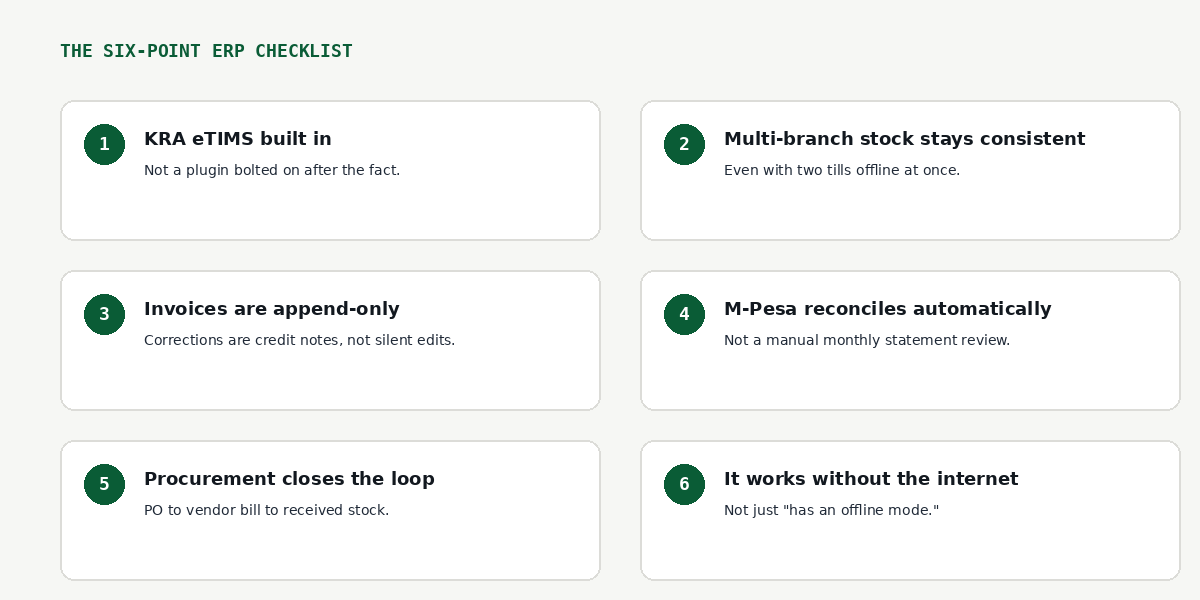
1. KRA eTIMS should be built in, not bolted on
Every ERP sold in Kenya today will claim eTIMS compliance. The real question is how it behaves when the device is offline at the moment of a sale. Software that blocks a transaction until KRA responds will eventually cost you a sale during a network drop. Software that creates the invoice immediately and marks it "eTIMS-pending" until the signature comes through is the version that survives an actual business day. If you want the fuller picture on how this should work, it's worth reading through the mechanics of eTIMS-pending invoicing on its own.
2. Multi-branch stock needs to survive two tills selling offline at once
This is the one buyers most often skip evaluating, and it's the one that causes the most damage later. Here's the scenario: two branches, or two tills at the same branch, both go offline, and both sell the last few units of the same item before either syncs back up.
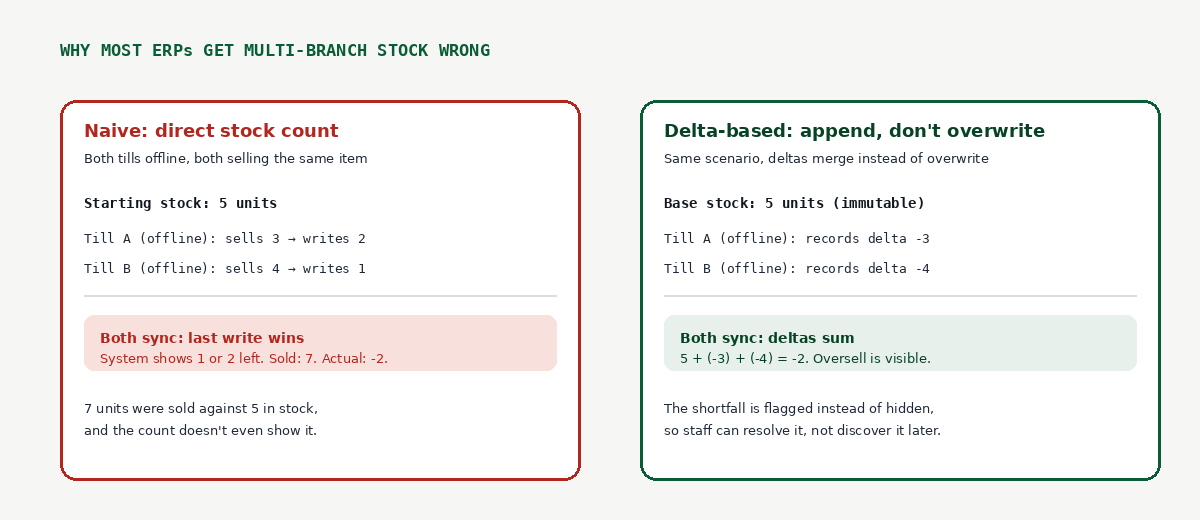
A system built on directly overwriting a stock count will silently oversell, and worse, the final number won't even show that anything went wrong. A system built to append sale and restock events as deltas, rather than overwrite a single number, will sum those events correctly when it syncs and surface the shortfall so someone can actually deal with it. This isn't a minor implementation detail, it's the difference between finding out about an oversold item from a customer complaint versus finding out from your own system.
Ask directly: what happens to stock counts when two locations sell the same SKU while both are offline? If the answer is vague, that's the answer.
3. Invoices should be append-only
An invoice that can be silently edited after the fact isn't a real audit trail, it's a liability waiting to surface during a KRA review or a dispute with a customer. Look for a system where a correction is issued as a proper credit note, referencing the original invoice, rather than an edit that overwrites history. This matters as much for your own bookkeeping sanity as it does for compliance: six months from now, you want to be able to see exactly what happened to an invoice, not just what it currently says.
4. M-Pesa should reconcile against your ledger, not sit in a separate app
A lot of systems treat M-Pesa as a payment method and stop there. What you actually want is the ability to match incoming M-Pesa transactions against specific invoices and see, at a glance, which payments haven't been matched yet. Without this, unmatched payments pile up quietly and your real revenue picture drifts away from what's in the bank.
5. Procurement needs to close the loop, not just track purchases
A purchase order that never connects to received stock, or a vendor bill that lives disconnected from the PO that generated it, means someone is manually cross-checking receipts against orders by hand. The loop should run cleanly: purchase order, to received stock, to vendor bill, with the vendor's KRA PIN and payment terms attached to the vendor record itself, not re-typed on every transaction.
6. "Works offline" should mean the core functions, not a maintenance-mode banner
Plenty of software claims offline support and means "you can view cached data, but can't do anything with it." What you actually need is the ability to create a new invoice, record a sale, and adjust stock while offline, with all of it syncing correctly once a connection returns. If offline mode is read-only, it's not offline-first, it's just a cache.
Red flags worth watching for
A few signs that an ERP will disappoint you after you've already committed:
- Demos that only show the happy path (single till, single branch, always connected)
- Vague answers to "what happens when X goes offline" for any core workflow
- No visible distinction between a draft invoice, an issued invoice, and a credit note
- Reporting that shows totals but can't show you which specific records are unreconciled or pending
None of these are deal-breakers you'll notice in a five-minute demo. They're the things that show up three months in, once real branches, real network conditions, and a real KRA filing deadline are all happening at once. Asking about them upfront costs you nothing and tells you more than any feature list will.
