
How M-Pesa STK Push Really Works (and Why Reconciliation Trips People Up)

If you run a shop, restaurant, or service business in Kenya, you already know the moment: a customer taps their card or hands over cash, or, more and more often, you type their number into the till and their phone buzzes with a payment prompt. That prompt is STK Push, and it's become the default way small businesses collect money here. What's less well understood is what has to happen correctly after that prompt for the payment to actually count as received.
What STK Push actually is
STK stands for SIM Toolkit, the same technology that powers those old-school phone menus you'd navigate with number keys before smartphones took over. Safaricom uses it to push a payment prompt directly onto a customer's SIM card, no app required, no internet connection required on the customer's end, just a basic feature phone works.
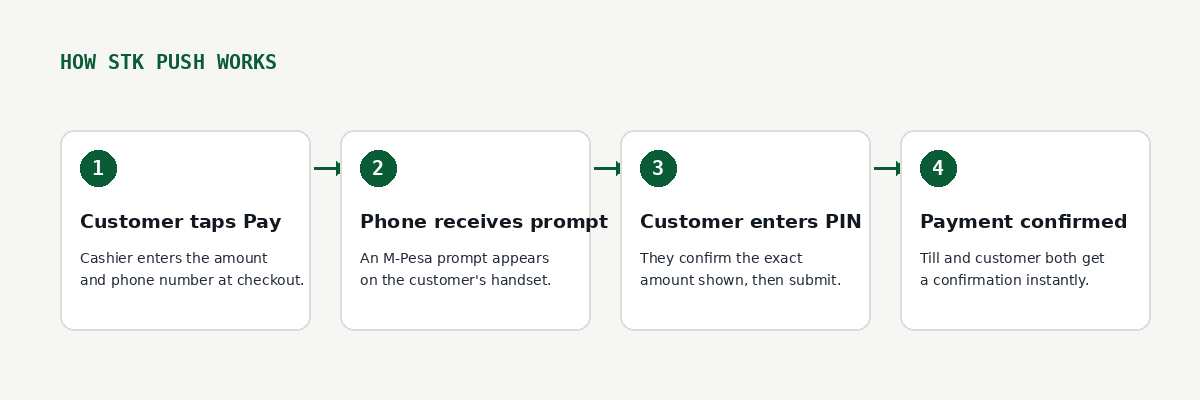
From the business side, the flow is simple:
- The cashier enters the sale amount and the customer's phone number at the till
- Safaricom sends a prompt to that number
- The customer enters their M-Pesa PIN and confirms
- Both sides get a confirmation almost immediately
This is faster and less error-prone than the alternative, a customer manually keying in a Paybill or Till number themselves, which is a common source of misdirected payments (typos happen under pressure at a checkout counter).
Where it gets complicated: reconciliation
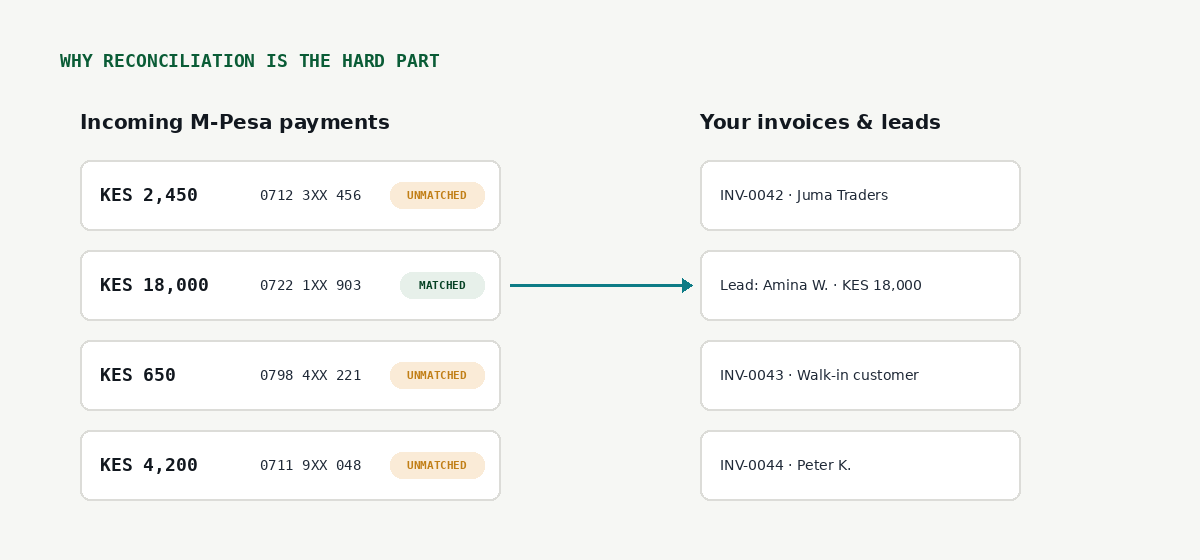
Here's the part that catches people off guard. STK Push confirms that a payment happened. It does not automatically tell your accounting system, your CRM, or your invoice list which sale, invoice, or lead that payment belongs to, especially if:
- The customer pays from a different phone than the one on file
- A payment comes in through a channel other than the STK prompt you sent (a customer just sends money to your Till directly, known as a C2B payment, without you initiating anything)
- Multiple invoices are open for the same customer and the amount doesn't cleanly match one of them
- The payment is for a deposit or partial amount, not the full invoice total
When this happens, the payment sits in your M-Pesa statement as real money that landed in your account, but nothing on your side has linked it to a specific customer record yet. Multiply this by dozens of transactions a day and it becomes a real bookkeeping problem, not just an occasional annoyance.
Why this matters more than it seems
An unmatched payment isn't lost money, it's still sitting in your account. But it creates three real problems if it's not resolved:
Your VAT and revenue records go quietly wrong. If a payment isn't linked to an invoice, it's easy for that sale to be under-recorded or double-counted later when someone tries to reconstruct what happened from memory.
Customers get chased for money they already paid. Nothing damages trust with a customer faster than a follow-up message asking for payment on something they settled last week, simply because the payment never got matched to their record.
Cash flow visibility gets fuzzy. If you're looking at "money in the bank" versus "money accounted for in the books" and the two don't agree, you can't trust either number until the gap is explained.
What actually fixes this
The solution isn't avoiding STK Push, it's exactly the opposite. It's building the matching step into your workflow as deliberately as the payment step itself:
- Surface unmatched payments somewhere you'll actually see them, not just buried in an M-Pesa statement PDF you check once a month
- Match on more than just the amount. Phone number, timestamp, and customer name all help disambiguate when two invoices happen to be for the same KES figure
- Make matching a two-minute daily habit, not a month-end scramble. The longer an unmatched payment sits, the harder it is to remember which sale it was actually for
- When a customer pays outside the till, via C2B directly to your Paybill or Till number, treat that as its own queue to check, since it never went through your STK prompt flow at all
This is exactly why "M-Pesa integration" as a feature is only half the story. The other half, and the half that actually saves time, is what happens to that payment the moment after it lands.
If you're evaluating POS, ERP, or CRM software and a vendor only talks about "accepting M-Pesa," it's worth asking the follow-up question: what happens to a payment that doesn't automatically match anything? That answer tells you a lot more about how the software will actually feel to use on a busy Friday.