
The till that never waits for a signal bar.
A till built for the shop in Kangundo as much as the office in Westlands: every sale rings up on-device, prints, and reconciles later. The network is a convenience, not a dependency.
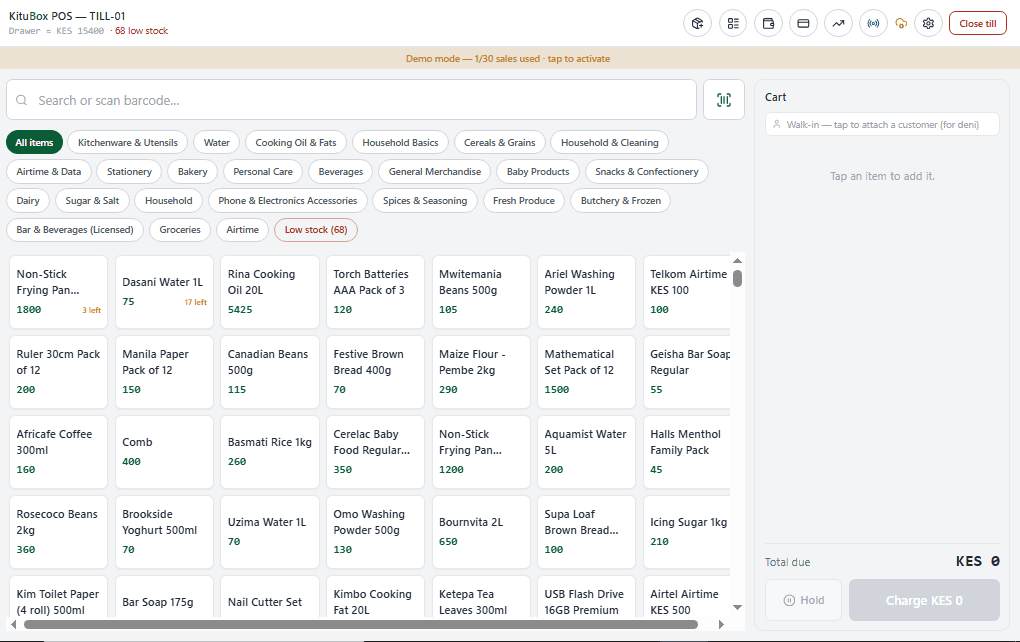
Till-01: item grid with low-stock badges and a live cart
See it before you launch it.
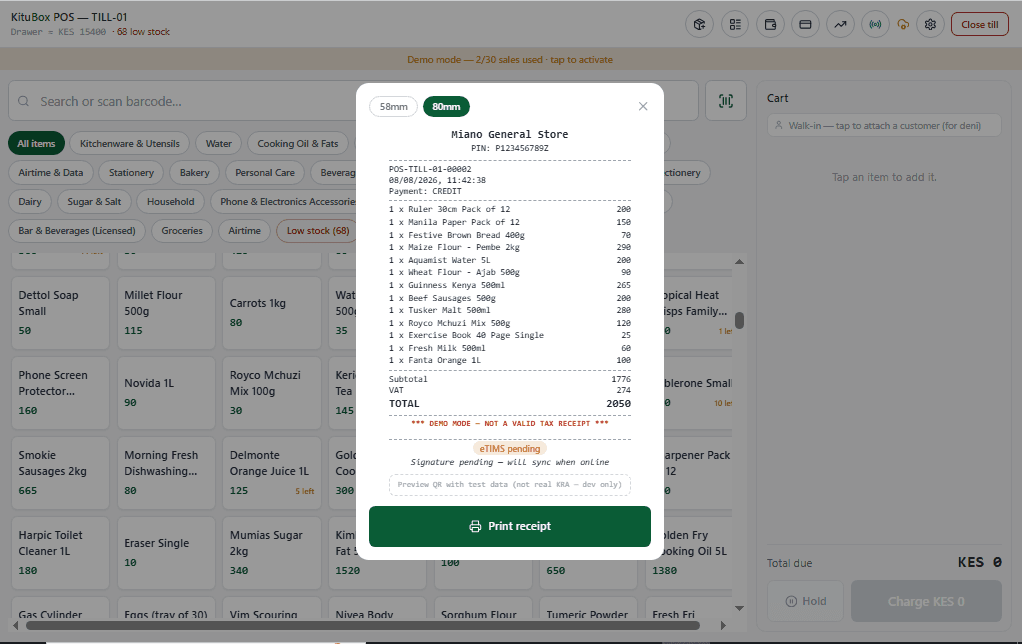
Receipt prints immediately; the eTIMS signature reconciles once the device is back online
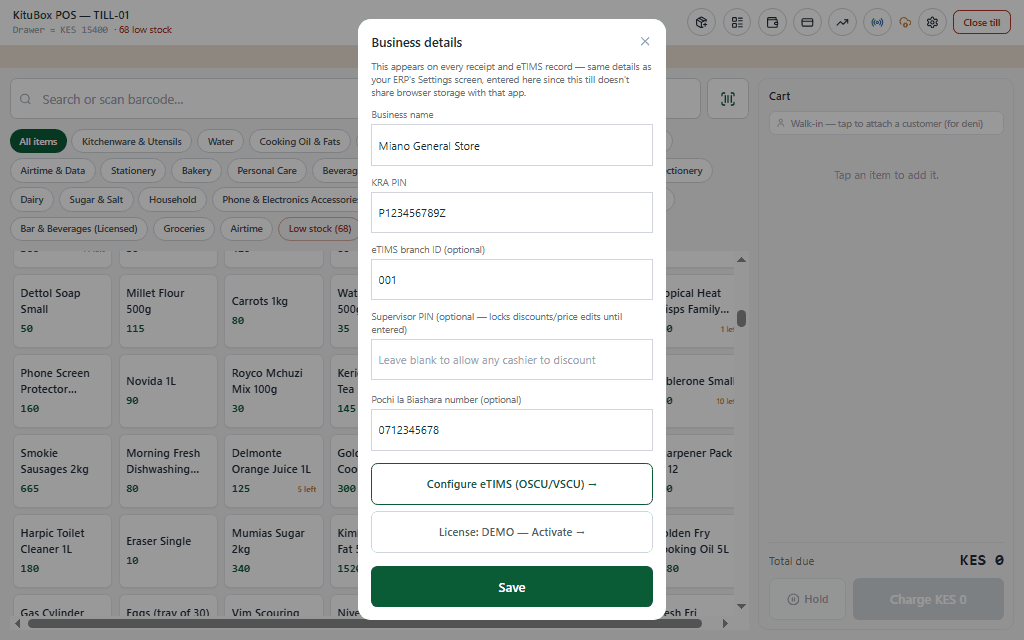
Business profile: KRA PIN, eTIMS branch ID, supervisor PIN lock, Pochi la Biashara number
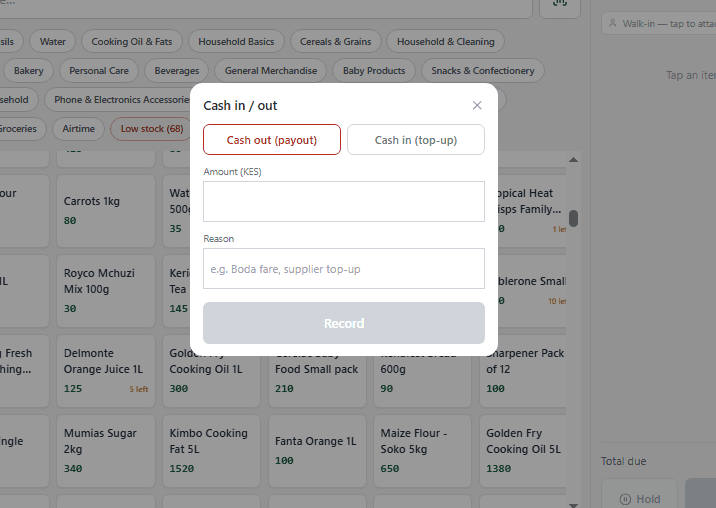
Cash in/out is logged against the till float, not just the register total
Built for how it actually gets used.
Sells with or without the internet
The cart, catalog, and till float all live on the device. A dropped connection never blocks a sale.
- Full item grid with category filters, barcode scanning, and low-stock badges
- Held orders: park a cart and recall it later without losing the line items
- Customer credit sales tracked per customer, settled when cash or M-Pesa comes in
- CSV item import and a dedicated item management panel for fast catalog setup
KRA eTIMS, handled as its own step
An invoice is created, printed, and handed to the customer as eTIMS-pending, never blocked waiting on a Control Unit response.
- Receipts print instantly and show a clear "eTIMS pending, will sync when online" status
- eTIMS QR code and signature status render once the Control Unit signs the sale
- OSCU/VSCU configuration lives in the business profile alongside your KRA PIN and branch ID
Till discipline built in
Open and close a float, log every payout, and reconcile against a Z-report at end of shift.
- Till open/close with a running drawer amount and full till history
- Cash in/out modal for supplier top-ups and boda fare payouts, each with a reason
- Z-report detail for shift reconciliation, plus a searchable sales history panel
- Supervisor PIN can lock discounts and price edits until entered
Front-of-house to kitchen
A floor plan, table-based ordering, and a kitchen display screen for food and drink service.
- Floor plan view for table-based service alongside quick-grid retail checkout
- Kitchen Display System (KDS) with kitchen order tickets (KOTs)
- M-Pesa STK Push, cash, and credit as payment options on the same sale
Multi-till, one shop
Two tills on the same premises sync directly to each other, even with no router in the loop.
- Peer-to-peer mesh sync directly between devices on the same network
- Cloud sync reconciles everything once a connection is available
- PIN-based staff login so a shared device still tracks who rang up what
4 tiers available, scaled by user count.
Not a global template with KES swapped in.
KRA PIN fields, county and town data, M-Pesa as a first-class payment method, and statutory numbers (NSSF, SHIF, Housing Levy, NITA) are part of the data model, not an add-on, because KituBox POS was built for Kenyan compliance from the first schema.
Questions about KituBox POS
What is the best offline POS system for shops and restaurants in Kenya?
KituBox POS is built for exactly this: retail shops, bars, and restaurants that need to keep selling through network drops. Every sale rings up, prints a receipt, and reconciles later, with M-Pesa STK Push, cash, and credit as payment options, plus a kitchen display screen and floor plan view for food and drink service.
Does KituBox POS issue KRA-compliant receipts?
Yes. Receipts print immediately and are marked "eTIMS-pending" until the Control Unit signature comes back, which happens automatically once the device reconnects. OSCU/VSCU setup, your KRA PIN, and eTIMS branch ID are configured once in the business profile.
Can two tills use KituBox POS on the same premises without Wi-Fi?
Yes. Devices on the same premises sync directly to each other over a peer-to-peer mesh connection, so stock and sales stay consistent between tills even with no router involved. Cloud sync catches everything up once a connection is available.
Does KituBox POS support M-Pesa payments?
Yes, M-Pesa STK Push is a built-in payment option at checkout, alongside cash and customer credit sales.
Is KituBox POS suitable for restaurants, or only retail?
Both. Alongside the retail item grid, KituBox POS includes a floor plan view for table-based service, a kitchen display system (KDS), and kitchen order tickets (KOTs) for food and drink service.
How much does KituBox POS cost?
KituBox POS is a one-time license fee, not a monthly subscription, starting at KES 7,500 for a single-user license. Multiuser tiers for shared inventory and multi-till locations, plus a bundle with a thermal receipt printer included, are available on the Pricing page.