
From first call to closed deal, on one board.
A pipeline built around how Kenyan SME sales actually happen: a phone call, a WhatsApp thread, a deal in KES, and a payment request sent the moment terms are agreed.
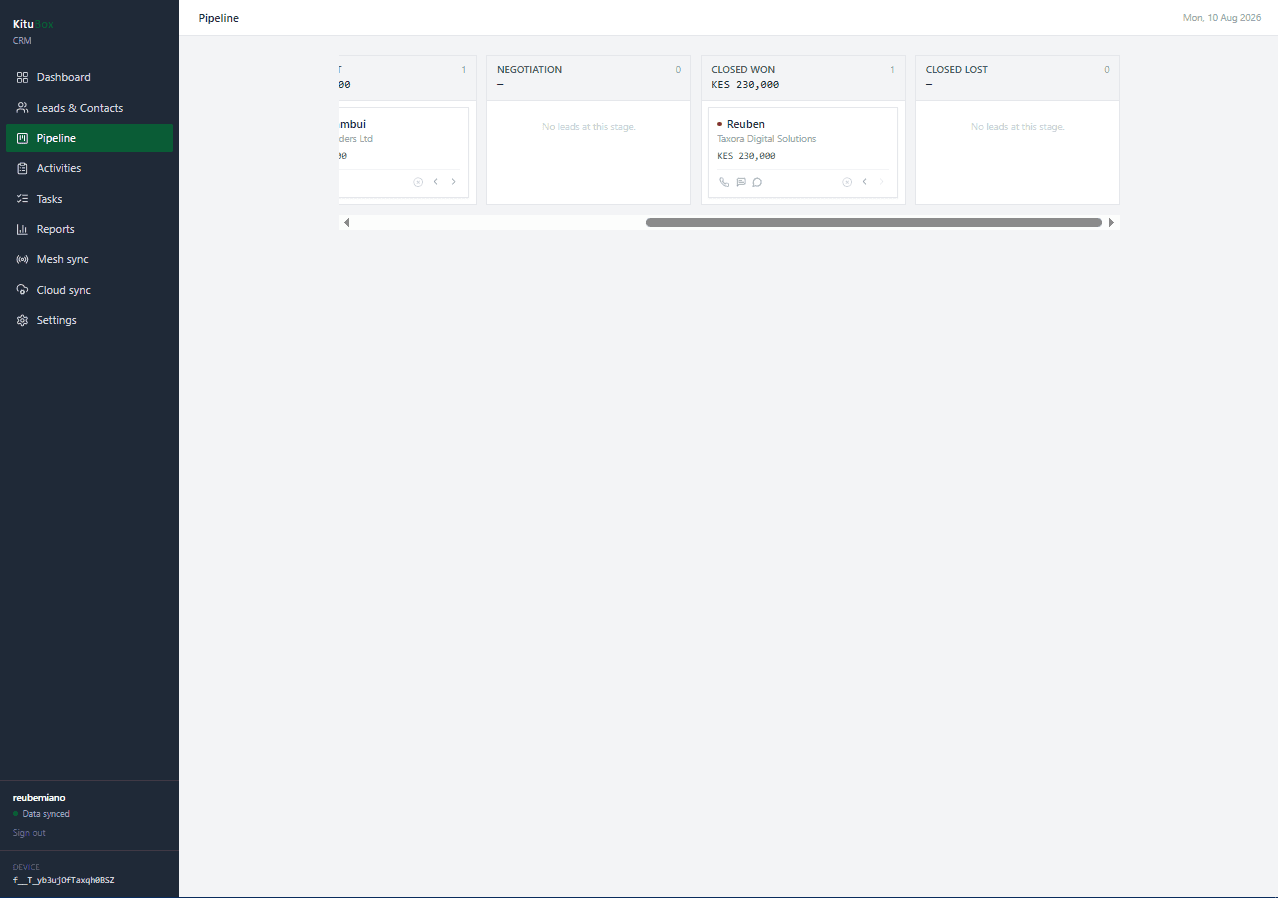
Pipeline board: one column per stage, a running KES total, and a card count on every column
See it before you launch it.
One account per business, with per-device sync underneath
Built for how it actually gets used.
Leads with Kenyan context built in
Not a generic contact card: fields for how business actually gets done here.
- Individual or corporate lead type, with KRA PIN and contact person for corporate accounts
- County and town captured alongside phone, for territory-aware follow-up
- Primary and secondary phone numbers with one-tap call, SMS, or WhatsApp
- Deal value in KES, lead temperature, and lead source tracked per record
A pipeline built for a touchscreen, not just a mouse
Stage moves are chevron taps first, drag-and-drop second.
- One column per pipeline stage, horizontally scrollable, with a running KES total and card count
- Back/forward chevrons as the primary way to move a deal; desktop drag-and-drop is a bonus, not a requirement
- "Mark lost" is an explicit action available from any stage, not just after negotiation
- A lost deal can be reopened, sending it back to Negotiation rather than starting over
M-Pesa and WhatsApp where the conversation already is
Payment requests and messaging without leaving the lead record.
- Send an M-Pesa payment request directly from a lead
- Unmatched C2B payments surfaced for manual matching to the right lead
- WhatsApp click-to-chat, with unmatched inbound messages surfaced for follow-up
Bridges to the rest of the suite
A won deal doesn't mean re-typing everything into another app.
- Quote bridge panel connects a lead directly to a KituBox ERP quote
- Activity log and task manager for follow-up cadence per lead
Reporting and sync
A sales dashboard and the same offline sync guarantees as the rest of KituBox.
- Sales dashboard with bar-chart and tabular reports by stage, source, and rep
- Mesh sync between devices on-site, plus cloud sync when connectivity returns
3 tiers available, scaled by user count and number of companies.
Not a global template with KES swapped in.
KRA PIN fields, county and town data, M-Pesa as a first-class payment method, and statutory numbers (NSSF, SHIF, Housing Levy, NITA) are part of the data model, not an add-on, because KituBox CRM was built for Kenyan compliance from the first schema.
Questions about KituBox CRM
What is the best CRM for Kenyan SMEs with M-Pesa and WhatsApp?
KituBox CRM is built around how Kenyan SME sales actually happen: a phone call or WhatsApp thread, a deal tracked in KES, and a payment request sent the moment terms are agreed, with KRA PIN and county/town fields for local business context.
Can I send an M-Pesa payment request from a lead in KituBox CRM?
Yes, directly from the lead record, and unmatched incoming C2B payments are surfaced so you can match them to the right lead.
Does KituBox CRM support WhatsApp?
Yes, with one-tap WhatsApp click-to-chat from any lead, and unmatched inbound WhatsApp messages surfaced for follow-up.
How does the KituBox CRM pipeline work?
Deals sit in a kanban-style pipeline board, one column per stage, with a running KES total and card count per column. Moving a deal forward or back is a tap on a chevron, so it works as well on a touchscreen as with a mouse. A lost deal can be reopened back into Negotiation rather than starting over.
Can a won deal in KituBox CRM become an invoice?
Yes, a Quote Bridge panel connects a lead directly to a KituBox ERP quote, so a closed deal doesn't need to be re-typed into another system.
How much does KituBox CRM cost?
KituBox CRM is a one-time license fee starting at KES 15,000 for a single-user license, with multiuser tiers for one company or up to five companies. See the Pricing page for details.